
On this page

After a partitioned table has been running for a while, the most common problem isn't "writes are failing" — it's that load has drifted. Some Regions absorb far more writes than others, driving up latency. Others become cold and tiny after workload changes, consuming resources with almost no traffic.
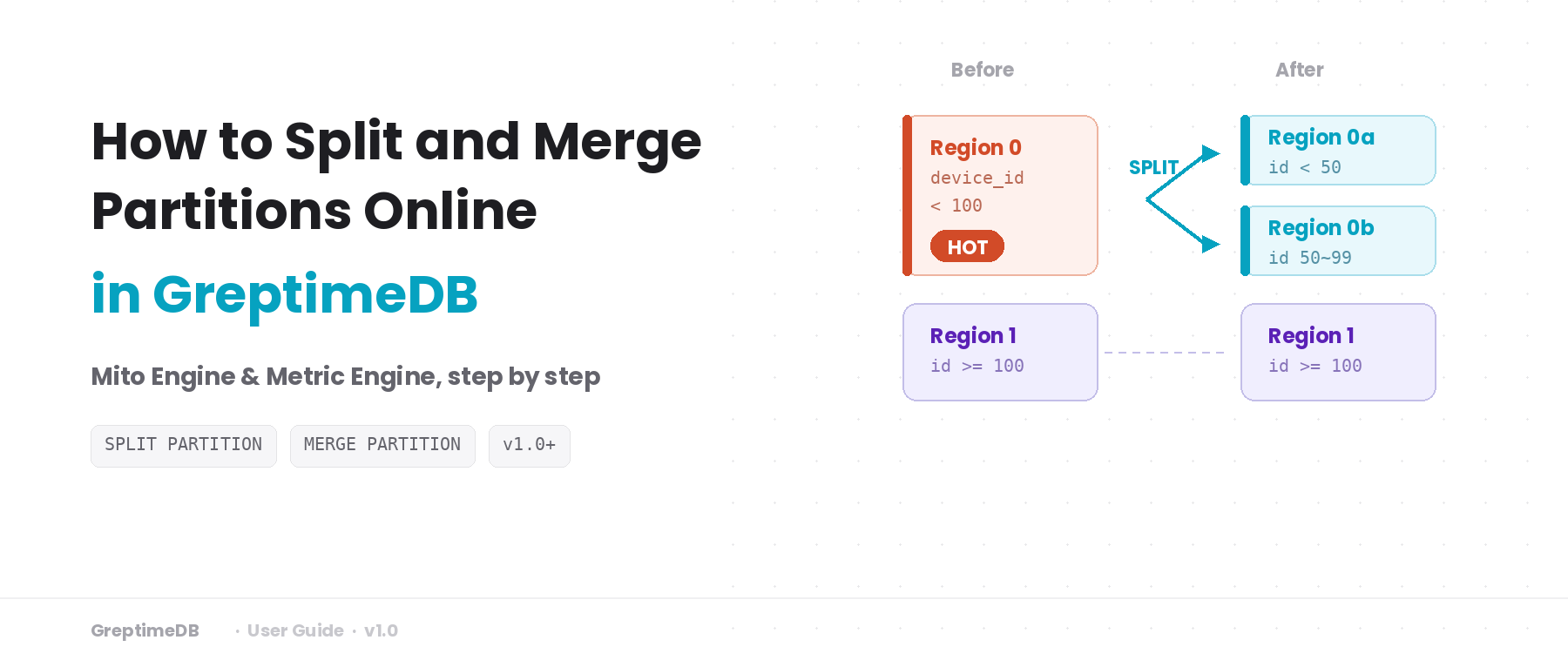
If you've used HBase, this will sound familiar — it's the same problem that Region Split and Region Merge solve. GreptimeDB provides SPLIT PARTITION and MERGE PARTITION to adjust partition boundaries online, so the rules match the current data distribution again.
This guide covers:
- How to tell when a table needs repartitioning.
- Step-by-step examples for both Mito Engine and Metric Engine tables.
- Checklists and common pitfalls.
Repartition in one sentence: an online adjustment of partition rules and Region routing. No physical data migration — the switch happens by updating manifest file references for each Region.
Version note:
SPLIT PARTITIONandMERGE PARTITIONwere introduced in GreptimeDB v1.0-rc.1. Make sure you're on the latest version before trying this.
Background: how partitioning works in GreptimeDB
A distributed GreptimeDB cluster has three core components:
- Frontend — A stateless proxy layer that accepts client requests and routes writes and queries to the correct Datanode based on partition rules.
- Metasrv — Manages cluster metadata: table schemas, partition rules, and the mapping of Regions to Datanodes.
- Datanode — Stores and serves data. Each Datanode can host multiple Regions.
When you create a table, you specify partition columns and rules with PARTITION ON COLUMNS. Each rule maps to one Region, and a Region is the smallest unit of data management and scheduling in GreptimeDB. Metasrv assigns Regions across Datanodes, and Frontend uses routing information from Metasrv to send requests to the right node.
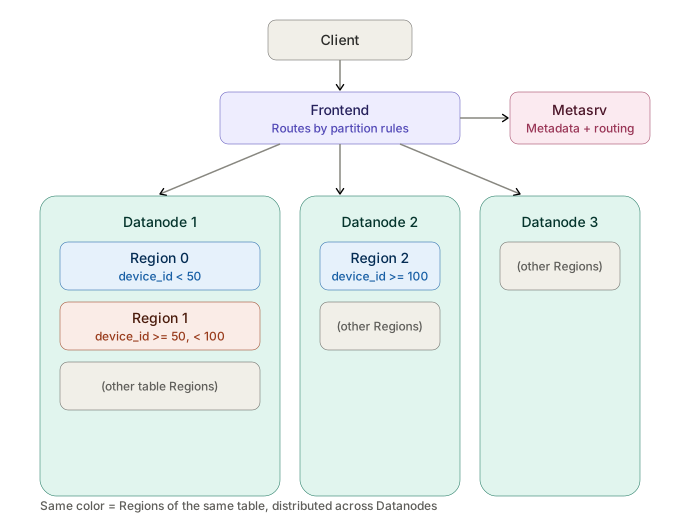
For example, if you partition by device_id into three ranges, Metasrv might spread the three Regions across three Datanodes — or place two on the same node, depending on current resource availability.
Each Region has a roughly fixed throughput ceiling. More Regions means higher aggregate throughput, but also more metadata overhead and scheduling complexity. The point isn't to maximize Region count — it's to keep load across Regions reasonably even.
When that balance breaks — some Regions become hotspots, others become too small to be worth the overhead — Repartition lets you fix it without rebuilding the table.
For more details, see the official docs: Table Sharding.
When to repartition
You don't need a monitoring dashboard to get started. These signals are enough.
Split signals — hotspots:
- Some partitions consistently show higher write volume or query latency than others.
- Query or write latency varies widely across Regions in the same table.
- Traffic patterns have shifted, and the original partition boundaries no longer fit.
Merge signals — fragmentation:
- Past splits have left some Regions with very little data and almost no writes.
- Region count is high enough that metadata overhead and scheduling pressure are noticeable.
- Adjacent partitions both have low traffic and would benefit from being combined.
Once you have a rough idea of the problem, don't jump straight into changing rules — first figure out which partition rule is the culprit.
Identifying the target partition
Map hot Regions to partition rules
This query joins Region-level write statistics with partition rules, so you can see which rule corresponds to the Region under the most pressure:
sql
SELECT
  t.table_name,
  r.region_id,
  r.region_number,
  p.partition_name,
  p.partition_description,
  r.region_role,
  r.written_bytes_since_open,
  r.region_rows
FROM information_schema.region_statistics r
JOIN information_schema.tables t
  ON r.table_id = t.table_id
JOIN information_schema.partitions p
  ON p.table_schema = t.table_schema
  AND p.table_name = t.table_name
  AND p.greptime_partition_id = r.region_id
WHERE t.table_schema = 'public'
  AND t.table_name = 'your_table'
ORDER BY r.written_bytes_since_open DESC
LIMIT 10;
Sample output:
table_name       | region_id       | region_number | partition_name | partition_description | region_role | written_bytes_since_open | region_rows
demo_hotspot_map | 19524921327616  | 0             | p0             | device_id < 100       | Leader      | 110                      | 2
demo_hotspot_map | 19524921327617  | 1             | p1             | device_id >= 100      | Leader      | 64                       | 1
Rules where written_bytes_since_open stays consistently higher are candidates for splitting. Adjacent partitions that are both low are candidates for merging.
Rule out node issues
Sometimes what looks like a hotspot is just a transient blip from a node problem. Run this query to check:
sql
SELECT
  p.region_id,
  p.peer_addr,
  p.status,
  p.down_seconds
FROM information_schema.region_peers p
WHERE p.table_schema = 'public'
  AND p.table_name = 'your_table'
ORDER BY p.region_id, p.peer_addr;
If nodes are healthy and the signal persists, you're ready to plan the repartition.
information_schema.region_statisticsreports approximate values — useful for relative comparisons and trends. Observe over a period of time before concluding, to avoid mistaking short-term noise for a real issue.
What happens internally during a repartition?
Before running this in production, it helps to know what's going on under the hood. The process has roughly 5 steps:
- Frontend validates the new rules. Metasrv diffs the old and new rules and generates an execution plan.
- The system executes the plan in groups. A brief write-pause window occurs while metadata is switched over.
- After a Datanode updates its Region rules, writes carrying the old rule version are rejected. Writes with the new version enter a staged state.
- The system computes and commits new manifests based on the old manifests and the old-to-new rule mapping. After commit, staged changes become visible to queries.
- Compaction resumes and caches gradually reload.
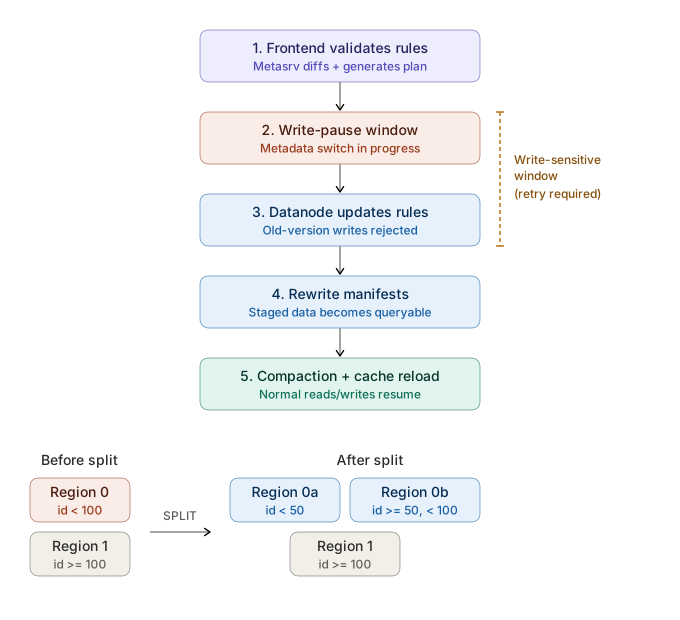
Repartition is not a zero-downtime operation. The most visible effect: writes may briefly fail during the change window, then recover.
Writes must retry
During the rule switch there's a short write-sensitive window: writes are paused, old-version requests get rejected, and cache refresh takes a moment. If clients treat these failures as terminal, the application sees errors. With backoff and retry on the write path, this window is typically transparent.
In practice:
- Use exponential backoff with jitter.
- Focus on eventual success, not first-attempt success.
- During the change window, watch post-retry success rate — not instantaneous failure counts.
Syntax overview
SPLIT PARTITION
Split one partition into two:
sql
ALTER TABLE table_name SPLIT PARTITION (
  source_partition_expr
) INTO (
  target_partition_expr_1,
  target_partition_expr_2
);
MERGE PARTITION
Merge two partitions into one:
sql
ALTER TABLE table_name MERGE PARTITION (
  partition_expr_1,
  partition_expr_2
);
DDL options
Append execution control options at the end of the statement:
sql
ALTER TABLE table_name SPLIT PARTITION (
  source_partition_expr
) INTO (
  target_partition_expr_1,
  target_partition_expr_2
) WITH (
  TIMEOUT = '5m',
  WAIT = false
);
WAIT = false: returns aprocedure_idimmediately, useful for async tracking.TIMEOUT: sets the operation timeout.
Current limitations (open-source edition): Only 1-to-2 splits and 2-to-1 merges are supported. These statements require a distributed cluster with shared object storage and GC properly enabled.
Example 1: Mito Engine table
This example is intentionally minimal: partition a table by device_id, split a hot partition, then merge it back.
Create the table
sql
CREATE TABLE demo_repart_mito (
  ts TIMESTAMP TIME INDEX,
  device_id INT,
  host STRING,
  method_name STRING,
  latency DOUBLE,
  PRIMARY KEY(device_id, host, method_name)
)
PARTITION ON COLUMNS (device_id) (
  device_id < 100,
  device_id >= 100
);
Insert sample data
sql
INSERT INTO demo_repart_mito (ts, device_id, host, method_name, latency) VALUES
  ('2026-03-10 10:00:00', 10, 'host1', 'GetUser', 103.0),
  ('2026-03-10 10:00:01', 60, 'host1', 'CreateOrder', 180.0),
  ('2026-03-10 10:00:02', 120, 'host2', 'GetUser', 96.0);
Split the hot partition
Say you've observed that the Region for device_id < 100 is a hotspot. Split it in two:
sql
ALTER TABLE demo_repart_mito SPLIT PARTITION (
  device_id < 100
) INTO (
  device_id < 50,
  device_id >= 50 AND device_id < 100
);
Verify
Check both partition rules and data:
sql
-- Partition rules
SELECT partition_name, partition_description
FROM information_schema.partitions
WHERE table_name = 'demo_repart_mito'
ORDER BY partition_name;

-- Data integrity
SELECT count(*) AS row_count_after_repartition FROM demo_repart_mito;
Expected output:
partition_name | partition_description
p0             | device_id < 50
p1             | device_id >= 100
p2             | device_id >= 50 AND device_id < 100

row_count_after_repartition
3
Three rules, same row count.
Merge fragmented partitions
If traffic to these two Regions drops later and they become cold fragments, merge them back:
sql
ALTER TABLE demo_repart_mito MERGE PARTITION (
  device_id < 50,
  device_id >= 50 AND device_id < 100
);
Run the same verification queries after the merge:
sql
SELECT partition_name, partition_description
FROM information_schema.partitions
WHERE table_name = 'demo_repart_mito'
ORDER BY partition_name;

SELECT count(*) AS row_count_after_merge FROM demo_repart_mito;
Example 2: Metric Engine table
The Metric Engine scenario differs from Mito Engine not in syntax, but in what you operate on.
Metric Engine logical tables depend on a physical table, so partition changes must target the physical table. Running Split or Merge on the logical table won't work.
Create the physical and logical tables
sql
-- Physical table
CREATE TABLE demo_metric_physical (
  ts TIMESTAMP TIME INDEX,
  host STRING,
  method_name STRING,
  latency DOUBLE,
  PRIMARY KEY(host, method_name)
)
PARTITION ON COLUMNS (host) (
  host < 'm',
  host >= 'm'
)
ENGINE = metric
WITH (physical_metric_table = 'true');

-- Logical table
CREATE TABLE demo_metric_logical (
  ts TIMESTAMP TIME INDEX,
  host STRING,
  method_name STRING,
  latency DOUBLE,
  PRIMARY KEY(host, method_name)
)
ENGINE = metric
WITH (on_physical_table = 'demo_metric_physical');
Insert sample data
sql
INSERT INTO demo_metric_logical (host, latency, ts, method_name) VALUES
  ('a01', 100.0, '2026-03-10 10:10:00', 'GetUser'),
  ('h01', 220.0, '2026-03-10 10:10:01', 'CreateOrder'),
  ('m01', 130.0, '2026-03-10 10:10:02', 'GetUser');
Split on the physical table
sql
ALTER TABLE demo_metric_physical SPLIT PARTITION (
  host < 'm'
) INTO (
  host < 'h',
  host >= 'h' AND host < 'm'
);
Verify
sql
-- Physical table partition rules
SELECT partition_name, partition_description
FROM information_schema.partitions
WHERE table_name = 'demo_metric_physical'
ORDER BY partition_name;

-- Confirm data integrity through the logical table
SELECT count(*) AS row_count_after_split FROM demo_metric_logical;
Expected output:
partition_name | partition_description
p0             | host < h
p1             | host >= m
p2             | host >= h AND host < m

row_count_after_split
3
Watch out for string boundary ordering
Metric Engine partition boundaries use lexicographic comparison. A common gotcha: 'host10' < 'host2' evaluates to true, because character-by-character '1' comes before '2'. Keep this in mind when designing string-based boundaries.
Merge fragmented partitions
When traffic drops, merge the split Regions back:
sql
ALTER TABLE demo_metric_physical MERGE PARTITION (
  host < 'h',
  host >= 'h' AND host < 'm'
);
Post-change checklist
Running the DDL successfully doesn't mean you're done. Make these part of your standard process:
SHOW CREATE TABLE— confirm the final rules match your intent.information_schema.partitions— verify partition boundaries and counts.- Application-side writes — confirm post-retry success rate is stable.
- Re-run the hotspot query and compare with pre-change TopN. For splits, check that load is more even. For merges, check that the Region count decreased.
Open-source vs. enterprise edition
The open-source edition provides full SPLIT PARTITION and MERGE PARTITION support, handling one-to-two splits and two-to-one merges per operation. After repartitioning, you'll typically migrate Regions to better-suited Datanodes manually. The enterprise edition builds on this with multi-Region splits and merges in a single operation, plus automatic Region load balancing.
Common issues
Incomplete rules: The new rules have a gap — some data doesn't match any partition. When splitting, make sure the two new rules fully cover the original rule's range.
Overlapping rules: Multiple partitions cover the same range, causing routing conflicts.
Wrong target object: Running Split or Merge on a Metric Engine logical table instead of the physical table.
Brief write failures: Expected during repartition. Make sure the write path has retry logic.
Summary
Hotspots and fragmentation are normal over the lifetime of a partitioned table. SPLIT PARTITION breaks up hotspots; MERGE PARTITION consolidates fragments. Use them together to keep partition rules aligned with actual load. Before going to production, run through the full workflow in a test environment, and make write-side retries plus pre/post hotspot comparison part of your runbook. Setting up monitoring to catch hotspot signals early is also a good idea.


