
On this page

You want to add partitions to a table after it's created. In the past, the only option was to rebuild it: create a new partitioned table, dual-write, backfill historical data, then cut over traffic. GreptimeDB v1.1 lets you run a single
ALTER TABLEto partition an existing, unpartitioned table, with no rebuild required.
Partition rules are usually fixed at table creation
In most databases that support partitioning, the partition rules have to be decided when the table is created, and they're hard to change afterward. When data volume is small, one table with a single shard is enough, so the limitation doesn't show. It surfaces once the data grows.
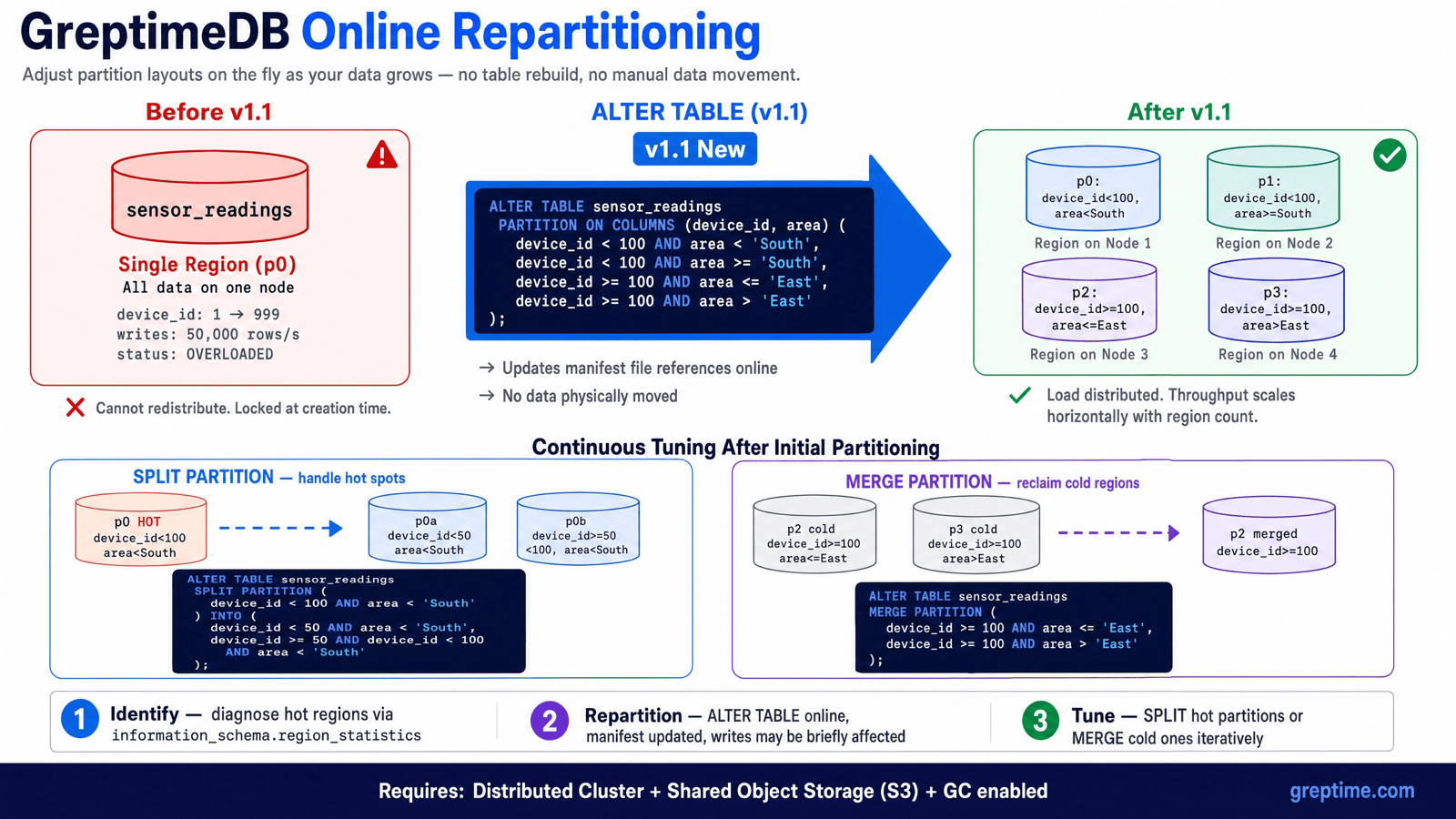
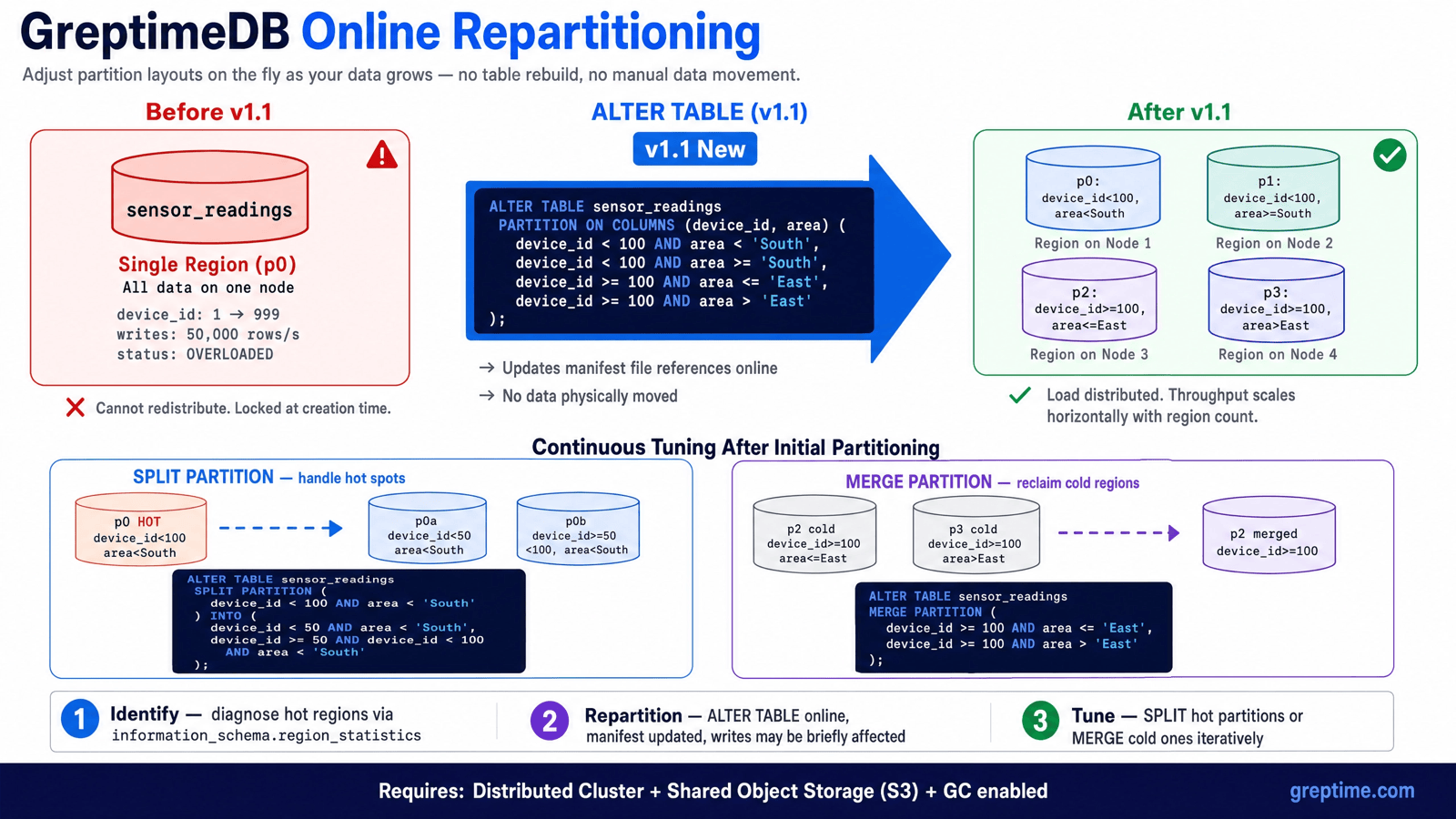
Take a sensor_readings table created without partitioning. As the number of devices grows from dozens to thousands, and writes climb from a few thousand rows per second to 50,000, everything lands on the same Region and the same node. That node becomes the bottleneck: write latency rises, queries slow down, and CPU and disk approach saturation, while the other nodes in the cluster sit idle.
At this point you want to add partitions and spread the load across nodes, but the partition rules can no longer be changed. The traditional path is the only one available:
- Create a new table with the new partition rules.
- Change the application side to dual-write to both the old and new tables.
- Backfill historical data from the old table into the new one.
- Verify consistency, cut over read traffic, and finally retire the old table.
Migrating TB-scale historical data takes a long time, consumes bandwidth, and affects the online workload, all while requiring application changes. So the partition scheme usually has to be planned up front, and adjusting it later is expensive.
This is exactly the gap GreptimeDB v1.1 closes: you can add partitions online to a table that already exists and isn't partitioned.
v1.1: online partitioning in a single DDL
Run the following statement:
sql
ALTER TABLE sensor_readings PARTITION ON COLUMNS (device_id, area) (
  device_id < 100 AND area < 'South',
  device_id < 100 AND area >= 'South',
  device_id >= 100 AND area <= 'East',
  device_id >= 100 AND area > 'East'
);
After it runs, the sensor_readings table, previously concentrated in a single Region, is split into four partitions that are scheduled onto four nodes. The load spreads out, and write throughput scales with the number of nodes. There's no new table, no dual-write, no historical backfill, and no change to application code.
ALTER TABLE that spreads across nodes, to continuous tuning with SPLIT / MERGE.How it works: decoupled compute and storage
This capability doesn't come from a piece of SQL syntax. It comes from the underlying architecture: the decoupled compute and storage design.
In a traditional shared-nothing architecture, each node's data sits on its own local disk. Repartitioning means physically moving data between nodes, copying TB-scale files from one machine to another. That process is slow and resource-heavy, which is a big reason many systems simply don't support changing partitions after a table is created.
GreptimeDB stores its data in shared object storage (S3 and compatible stores), not bound to any single node's local disk. A Region is a logical shard: it references data files in object storage through manifest files rather than holding the data itself. Repartitioning is therefore a metadata operation. It updates the manifest file references for each Region, switches to the new partition layout, and recomputes routing. The data itself never moves between nodes.
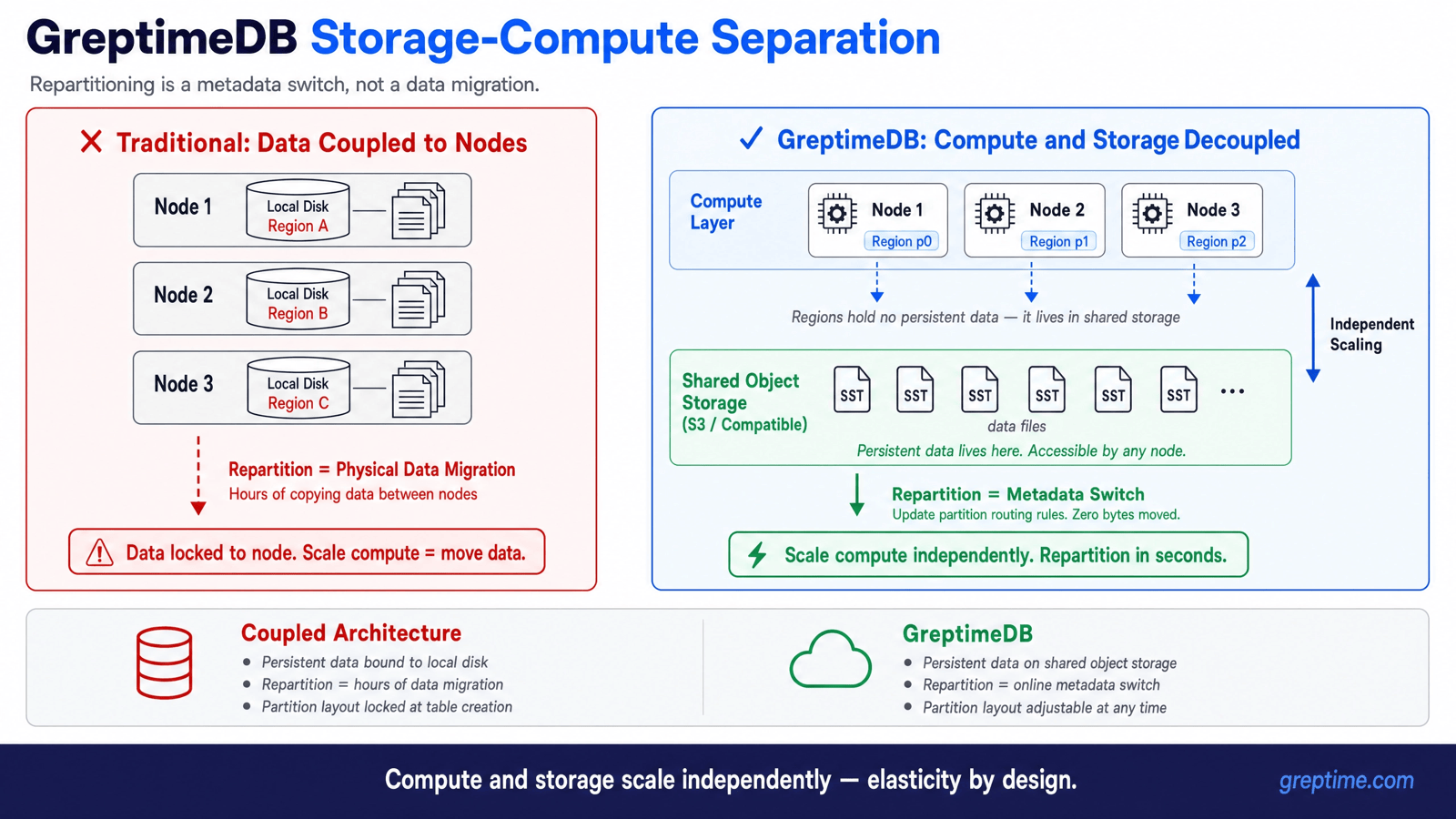
This is the elasticity that decoupled compute and storage brings: compute and storage scale independently, and the partition layout can follow the workload instead of being fixed at table creation. On a local-disk architecture, repartitioning a large table is an hours-long data migration. In GreptimeDB, the same task is an online metadata switch.
Writes may fluctuate briefly during repartitioning. The official guidance is to enable client-side retries, which smooths the transition.
After partitioning: splitting and merging
Turning an unpartitioned table into a partitioned one is only the first step. Data distribution changes over time, and a layout that's balanced today may develop hotspots or cold regions tomorrow. GreptimeDB offers two operations to adjust existing partitions: SPLIT PARTITION splits an overheated partition to increase write concurrency, and MERGE PARTITION merges partitions that have grown cold and small to reclaim resources.
sql
-- Split a hot partition
ALTER TABLE sensor_readings SPLIT PARTITION (
  device_id < 100 AND area < 'South'
) INTO (
  device_id < 50  AND area < 'South',
  device_id >= 50 AND device_id < 100 AND area < 'South'
);

-- Merge cold partitions
ALTER TABLE sensor_readings MERGE PARTITION (
  device_id >= 100 AND area <= 'East',
  device_id >= 100 AND area > 'East'
);
Beyond splitting on existing partition columns, SPLIT PARTITION ... ON COLUMNS can introduce a new partition column as part of the split. For example, a table initially partitioned only by device_id can later be divided further by area:
sql
-- Initially partitioned by device_id only
ALTER TABLE sensor_readings PARTITION ON COLUMNS (device_id) (
  device_id < 100,
  device_id >= 100
);

-- Introduce a new partition column, area, during the split
ALTER TABLE sensor_readings SPLIT PARTITION (
  device_id < 100
) ON COLUMNS (device_id, area) INTO (
  device_id < 100 AND area < 'South',
  device_id < 100 AND area >= 'South'
);
After the split, the table's partition columns become (device_id, area). So the partitioning dimensions themselves can evolve with the business, not just the boundaries within existing dimensions.
For a complete step-by-step walkthrough of splitting and merging on an already-partitioned table, see the companion tutorial: How to Split and Merge Partitions Online in GreptimeDB.
Together with the initial partitioning from PARTITION ON COLUMNS, this forms a complete flow: from unpartitioned, to partitioned, to continuously adjusted as the load changes.
The operational loop: diagnose, execute, iterate
Online repartitioning turns capacity management into an observable, iterable loop.
Start by diagnosing which Region is under heavy load. Join Region-level statistics with the partition rules:
sql
SELECT
  t.table_name,
  r.region_id,
  r.region_number,
  p.partition_name,
  p.partition_description,
  r.written_bytes_since_open,
  r.region_rows
FROM information_schema.region_statistics r
JOIN information_schema.tables t
  ON r.table_id = t.table_id
JOIN information_schema.partitions p
  ON p.table_schema = t.table_schema
  AND p.table_name = t.table_name
  AND p.greptime_partition_id = r.region_id
WHERE t.table_schema = 'public'
  AND t.table_name = 'sensor_readings'
ORDER BY r.written_bytes_since_open DESC
LIMIT 10;
A partition whose written_bytes_since_open stays consistently high is a good candidate for splitting. At the same time, query information_schema.region_peers to confirm the corresponding nodes are healthy, so you don't mistake node instability for a hotspot.
Beyond SQL, GreptimeDB's built-in Grafana dashboards now include a Hotspot section (Hotspot Regions, Datanode write load, and data distribution) that surfaces hot Regions and write-skewed Datanodes visually, see greptimedb#8098.
Next, execute: run the matching ALTER TABLE online. This updates the metadata, and writes may fluctuate briefly.
Then iterate: watch the new load distribution and keep splitting hot partitions or merging cold ones as needed.
Things to keep in mind
Online repartitioning depends on the decoupled compute and storage architecture, so there are a few prerequisites:
- It's supported only in distributed clusters. Standalone deployments can't repartition.
- You must use shared object storage (such as AWS S3) so all Datanodes can access the same copy of data.
- GC must be enabled on Metasrv and all Datanodes. Object storage holds the Region files, and GC reclaims a file only after its old references are released, which prevents accidentally deleting data still in use during repartitioning.
A few practical details:
- The partition arguments to
SPLITandMERGEmust exactly match an existing partition rule. The common cases are 1-to-2 splits and 2-to-1 merges; more complex changes can be done in several split and merge steps. - Repartitioning statements support asynchronous execution. Adding
WITH (WAIT = false)returns aprocedure_idimmediately, which you can track withADMIN procedure_state(procedure_id).TIMEOUTcontrols the overall time limit and applies whetherWAITis true or false.
sql
ALTER TABLE sensor_readings SPLIT PARTITION (
  device_id < 100 AND area < 'South'
) INTO (
  device_id < 50  AND area < 'South',
  device_id >= 50 AND device_id < 100 AND area < 'South'
) WITH (
  TIMEOUT = '5m',
  WAIT = false
);
What this means if you're evaluating GreptimeDB
If you're evaluating GreptimeDB's scalability and operational cost, online repartitioning changes two things.
The first is scalability. A table's capacity is no longer constrained by the partition decision made at creation time. An online table can be repartitioned and scaled out as data grows, with no downtime and no rebuild.
The second is operational cost. Thanks to decoupled compute and storage, repartitioning is a lightweight metadata switch rather than a TB-scale data migration. The partition plan doesn't have to be fixed once at table creation; it can be adjusted continuously as the load changes.
Enterprise: automatic load balancing with Autopilot
Everything above is manual repartitioning: you diagnose the hotspots, decide whether to split or merge, and run the statements yourself. GreptimeDB Enterprise's Autopilot automates this workflow. It runs inside Metasrv, continuously collecting write statistics from Datanodes and Regions, smoothing out short-term fluctuations, and submitting scheduling actions when the configured conditions are met.
Autopilot includes two complementary strategies:
- Auto Repartition automatically splits large Regions that may become bottlenecks into smaller ones. It works on tables that already have partition rules. Once you've partitioned a table with
PARTITION ON COLUMNS, the ongoing splitting can be handed off to it; it won't generate partitions for a table that has no partition rules at all. - Region Balancer automatically migrates hot Regions across Datanodes to balance the write load among nodes.
The two share the same runtime and cluster statistics, and together they keep the partition distribution and node load evenly balanced, taking the manual diagnosis and decision-making off your plate. You can tune their behavior through configuration options such as plugins.auto_repartition and plugins.region_balancer, including the split trigger ratio, the maximum number of parts per split, and cooldown periods.
Further reading
- How to Split and Merge Partitions Online in GreptimeDB: a step-by-step tutorial for an already-partitioned table
- Repartition documentation: prerequisites, hotspot detection, and full syntax
- ALTER TABLE reference: SQL syntax details for repartitioning
- Autopilot documentation: Enterprise Auto Repartition and Region Balancer


